Back pain is one of the most common complaints among office workers today. Millions of people spend eight or more hours sitting at a desk every day. However, most of them never think about how their chair affects their spine. The truth is, the right chair can make a huge difference. It can prevent pain, improve your focus, and help you feel better at the end of the day.
This article will show you how to choose the right office chair, how to set it up correctly, and how to build healthy habits while you work. Let us get started.
Why Your Chair Matters More Than You Think
Most people blame their back pain on stress or aging. However, poor seating is often the real cause. When you sit in a bad position for hours, your muscles tighten and your spine curves in ways it should not. Over time, this leads to chronic pain and stiffness.
A good office chair supports your lower back and keeps your spine in a natural position. Additionally, it helps reduce pressure on your hips and tailbone. Therefore, investing in a quality chair is not a luxury. It is a health decision.
The good news is that you do not always need to buy the most expensive chair on the market. What matters most is understanding what features to look for and how to use them properly.
Key Features to Look for in an Office Chair
Not all office chairs are created equal. Some offer basic padding while others come loaded with adjustable features. Here are the most important things to check before you buy.
Lumbar Support: The Foundation of a Pain-Free Back
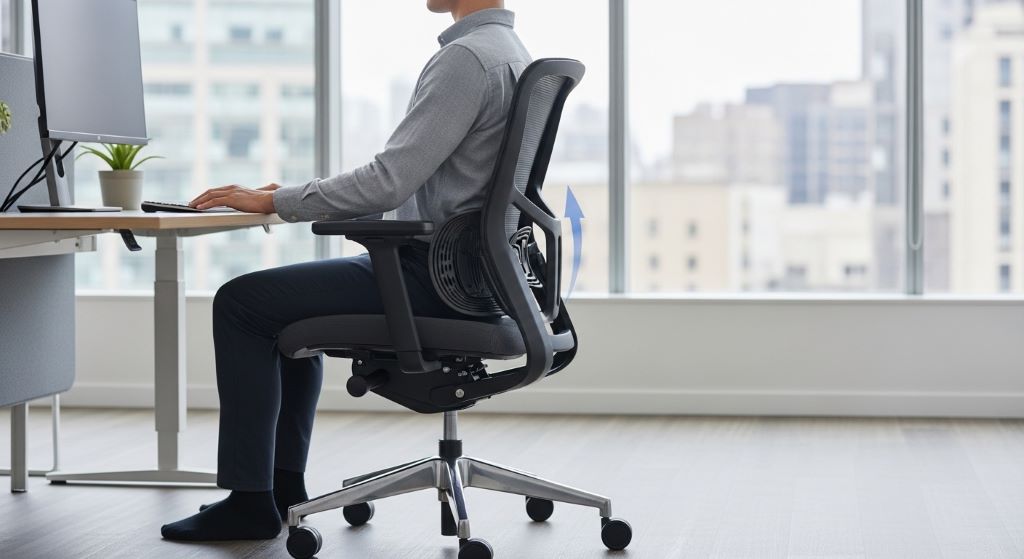
The lower back, or lumbar region, carries most of the stress when you sit. A lumbar support chair is designed to fill the natural curve of your lower back. This keeps your spine from rounding forward, which is one of the main causes of back pain.
Look for a chair with adjustable lumbar support. This allows you to move the support up or down until it fits the exact curve of your back. Additionally, some chairs let you adjust the depth, so you can control how much the support pushes into your back.
If your chair does not have built-in lumbar support, do not worry. You can use a small cushion or a rolled-up towel instead. Place it just above your hips for the best effect.
Seat Height and Depth
Seat height is easy to overlook, but it plays a big role in your comfort. When your seat is too high, your feet dangle and your hips tip backward. When it is too low, your knees rise above your hips, creating pressure on your lower back.
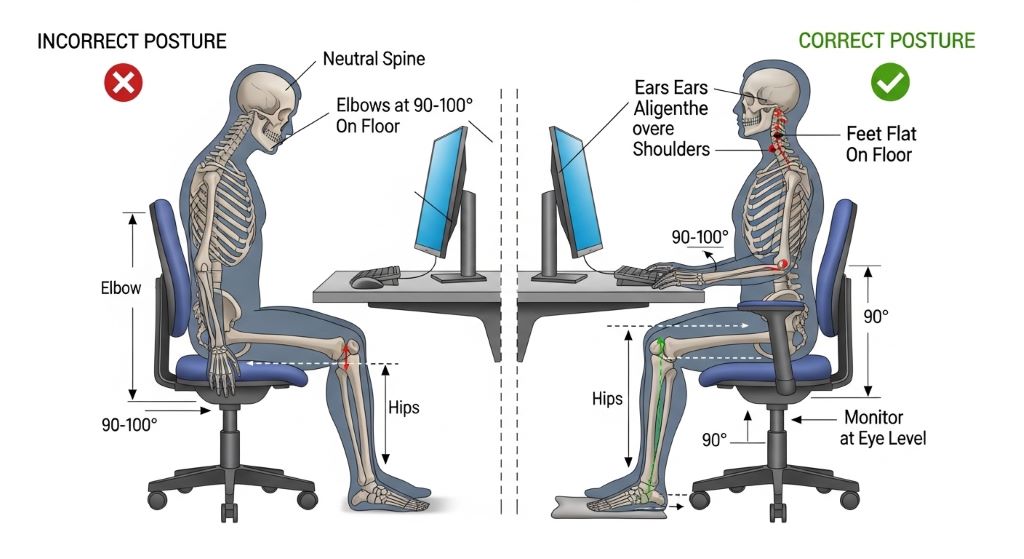
Set your chair height so that your feet rest flat on the floor and your knees are at about a 90-degree angle. Your thighs should be roughly parallel to the ground. Furthermore, make sure there are two to four finger widths of space between the back of your knees and the edge of the seat. This prevents pressure on your legs and improves blood flow.
Armrests and Backrest Tilt
Armrests help reduce strain on your shoulders and neck. However, they should not force your arms upward or outward. Adjust them so your elbows sit at a comfortable 90-degree angle. Your shoulders should stay relaxed, not hunched.
A backrest that reclines slightly can also help. Sitting at a slight backward angle of around 100 to 110 degrees reduces disc pressure in your spine. Therefore, look for a chair that allows you to lock the backrest at different angles throughout the day.
Spine Alignment Tips While Sitting
Even the best chair cannot help you if you sit in it incorrectly. Following a few spine alignment tips can make a real difference in how your back feels by the end of the day.
Here is what you should keep in mind:
- Keep your back flat against the chair, with your lower back touching the lumbar support.
- Your shoulders should be relaxed and back, not rounded forward.
- Your head should sit directly above your shoulders, not leaning forward toward the screen.
- Your monitor should be at eye level so you do not have to bend your neck up or down.
- Keep your keyboard and mouse close enough that your elbows stay at your sides.
Additionally, try to shift your weight occasionally. No single position is perfect for extended periods. Small movements throughout the day help keep your muscles active and your spine healthy.
The Role of Sitting Posture in Long-Term Back Health
Good sitting posture is not just about how you feel today. It is about protecting your spine for years to come. When you maintain proper posture consistently, you reduce the wear on your spinal discs and joints. Over time, this lowers your risk of developing serious conditions like herniated discs or sciatica.
However, maintaining perfect sitting posture all day is harder than it sounds. Our bodies naturally drift into slouching, especially when we are tired or focused on a task. Therefore, it helps to set a reminder on your phone every 30 to 60 minutes to check in with your posture.
Some people find it useful to use a posture app or a wearable device. These tools gently alert you when you start to hunch. Others simply place a sticky note on their monitor that says sit up straight. Whatever method works for you, the key is building awareness.
Take Breaks and Move More
No office chair, no matter how good it is, can replace the benefits of movement. Sitting for long periods slows blood flow and tightens your muscles. Therefore, standing up and moving around regularly is essential.
Try following the 30-30 rule. Sit for 30 minutes, then stand or walk for at least 5 minutes. This simple habit can reduce muscle tension and improve your energy levels throughout the day.
Additionally, try doing a few gentle stretches at your desk. Shoulder rolls, neck tilts, and seated spinal twists only take a minute or two. However, they can relieve a surprising amount of tension.
If your workplace allows it, consider using a standing desk for part of the day. Alternating between sitting and standing keeps your body active and reduces the strain on any one area.
Setting Up Your Workstation for Maximum Comfort
Your chair is just one part of your workstation. The arrangement of your desk, monitor, keyboard, and mouse all affect how your body feels during the day.
Start by positioning your monitor directly in front of you, about an arm’s length away. The top of the screen should be at or slightly below eye level. This prevents you from tilting your head up or down, which causes neck strain over time.
Next, place your keyboard and mouse at a height where your forearms are parallel to the floor. Your wrists should stay straight as you type, not bent upward or downward. If needed, use a wrist rest for extra support.
Furthermore, make sure your desk is not cluttered. A clear workspace encourages you to sit closer to your screen, which naturally improves your posture. A few small changes to your setup can have a big impact on how your back feels.
Conclusion
Reducing back pain at work starts with the right office chair. A lumbar support chair can keep your lower spine in a natural curve and prevent the slouching that leads to pain. However, the chair is only one piece of the puzzle.
You also need to follow basic spine alignment tips, set up your workstation correctly, and build habits that keep you moving throughout the day. Additionally, paying attention to your sitting posture consistently can protect your back for the long term.
Small changes add up quickly. Start today by adjusting your chair height, checking your monitor position, and taking a short walk every 30 minutes. Your back will thank you for it.
Frequently Asked Questions
1. How do I know if my office chair has good lumbar support?
A chair with good lumbar support should have a curved section in the lower back area that fills the gap between your back and the seat. If you can adjust the height and depth of this curve, that is even better. When you sit all the way back, your lower back should feel gently supported, not pushed forward uncomfortably.
2. Can a bad office chair cause permanent back damage?
Over many years, consistently poor sitting posture can contribute to disc degeneration, muscle imbalances, and chronic pain. However, most cases of office-related back pain are not permanent. With the right chair, proper posture habits, and regular movement, many people see significant improvement.
3. How often should I take breaks from sitting?
Most health experts recommend standing or moving for at least five minutes every 30 to 60 minutes of sitting. Even a short walk to get water or a few desk stretches can reduce muscle tension and improve circulation. Regular breaks also help your focus and productivity.
4. Is a standing desk better than a good office chair?
Neither is better on its own. Both sitting and standing for long periods can cause problems. The best approach is to alternate between the two throughout the day. A height-adjustable desk combined with a quality office chair gives you the most flexibility and comfort.
5. What exercises can help reduce back pain from sitting all day?
Several exercises can help counteract the effects of prolonged sitting. Hip flexor stretches, cat-cow stretches, and seated spinal twists are all effective. Strengthening your core muscles through exercises like planks and bridges also provides better support for your lower back throughout the workday.
Related Topics:
How to Plan a Low Phenylalanine Meal for Adults with PKU
How to Manage Lower Back Pain at Home Without Medicine